
Most communications APIs are powerful. But the operational layer around them is a mess. Delivery logs live in one tab, carrier error codes in another, billing in a third. Answering a simple question about your own infrastructure requires five tools and ten manual steps.
The Wavix MCP Server changes that. Instead of jumping between dashboards, SQL editors, and logging tools, developers can query and manage communications infrastructure through natural language — directly from AI coding environments like Claude Code, Cursor, VS Code, and Codex.
Here are five practical examples of what that looks like in real workflows.
1. Debug a Failed SMS Delivery in Seconds
“Why did the SMS to +447700900123 fail yesterday?
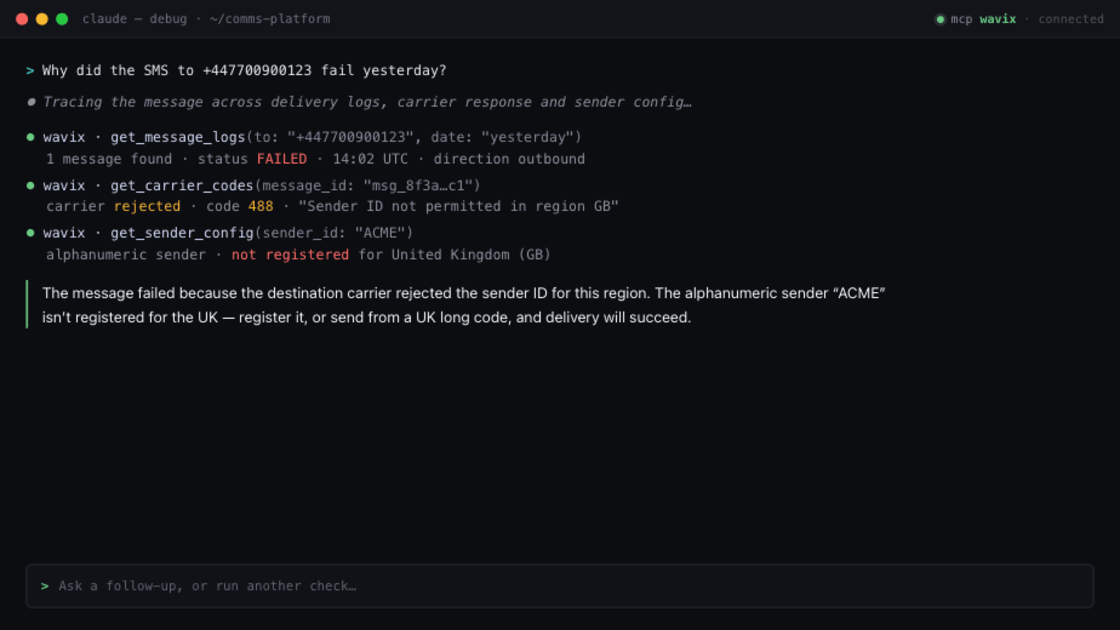
Normally, debugging a failed message means opening delivery logs, filtering by number, tracing carrier response codes, and matching timestamps across systems. That’s four tools before you have an answer.
With the Wavix MCP Server, the agent queries messaging logs, retrieves carrier response codes, and inspects sender configuration in one pass. The developer gets a plain-language explanation:
“The message failed because the destination carrier rejected the sender ID for this region.”
For production teams, that’s the difference between a two-minute fix and a twenty-minute investigation.
2. Pull Unanswered Calls Without SQL or Dashboards
“Show me all unanswered inbound calls from yesterday between 9 AM and 5 PM for our support line.”
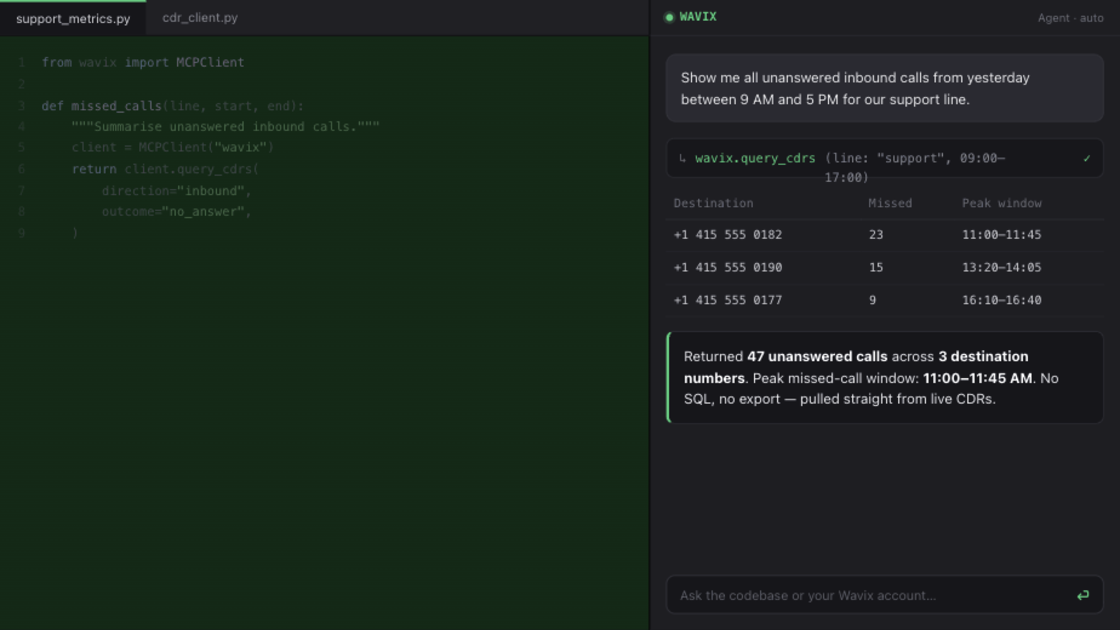
This is the kind of operational question support teams and developers field constantly. Traditionally it means exporting call logs, and building a summary manually.
The Wavix MCP Server queries live CDRs, filters by time range and outcome, and groups by destination - no SQL, no export, no dashboard.
“Returned 47 unanswered calls across 3 destination numbers. Peak missed-call window: 11:00–11:45 AM.”
For teams managing support queues, outbound campaigns, or Voice AI systems, removing that manual overhead adds up fast.
3. Search Call Transcripts for Keywords Using Speech Analytics
“Find all calls from this week where customers mentioned ‘refund,’ ‘cancel my subscription,’ or requested escalation to a manager.”
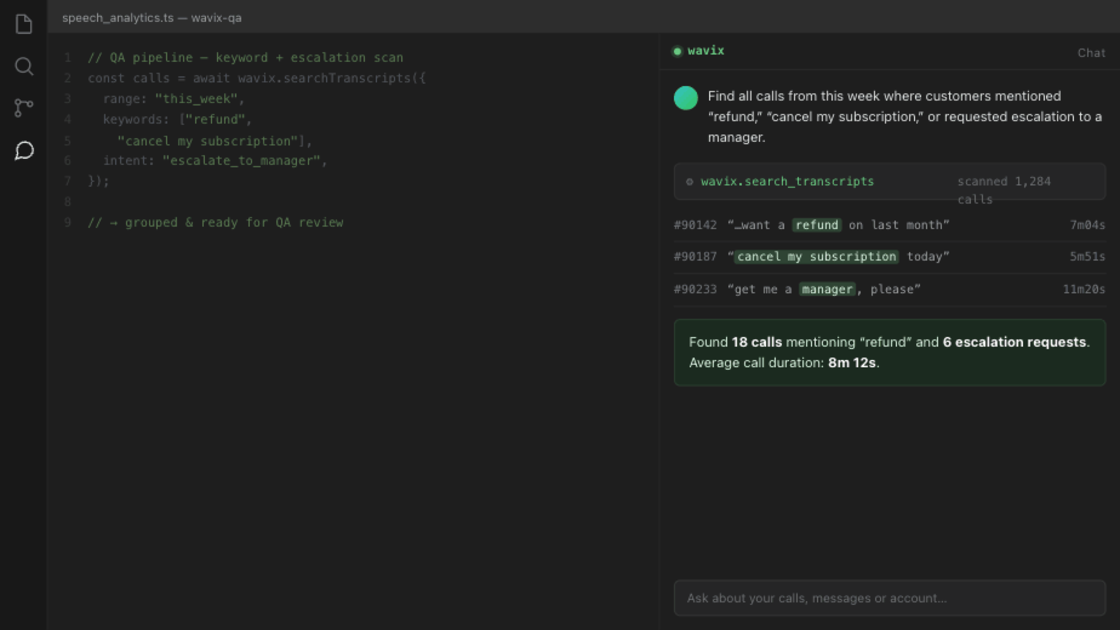
Most MCP implementations today focus on operational APIs. Very few expose searchable speech analytics and transcript workflows through natural language prompts.
A prompt replaces what used to be a custom search pipeline built on top of your transcript store.
“Found 18 calls mentioning ‘refund’ and 6 escalation requests. Average call duration: 8m 12s.”
That opens up workflows that weren’t practical before: QA teams surfacing escalations without reviewing recordings, support managers tracking refund trends in real time, Voice AI teams identifying failed conversations, compliance teams running keyword audits across thousands of interactions.
4. Find and Provision a Phone Number Through a Single Prompt
“Find an SMS-enabled phone number in Germany with voice support and purchase the best available option for outbound campaigns.”
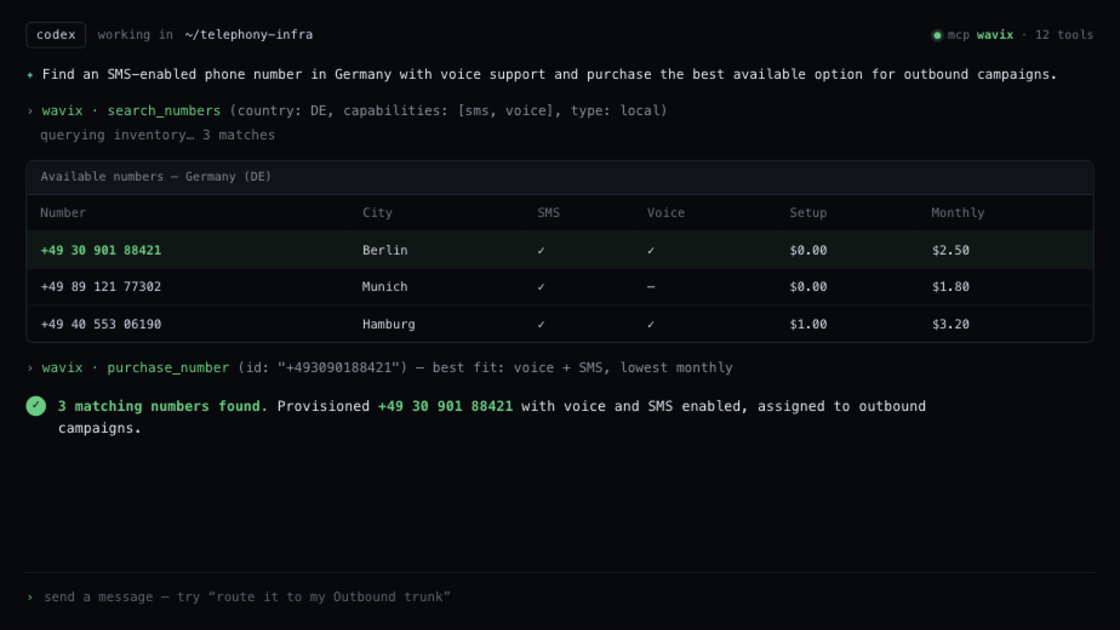
Provisioning a number normally involves searching inventory, filtering by country and capability, verifying compatibility, and completing the provisioning steps manually — across multiple screens.
With the Wavix MCP Server, the agent queries number inventory, filters by country and capability, and provisions the selected number directly to the account.
“3 matching numbers found. Provisioned +49 XXX XXX XXXX with voice and SMS enabled.”
For teams managing multi-region deployments or scaling communications infrastructure quickly, this collapses what used to be a multi-step workflow into a single prompt.
5. Check Billing Balance and Estimate Send Capacity
“Check my current account balance and estimate how many SMS messages we can still send to UK mobile numbers this month.”
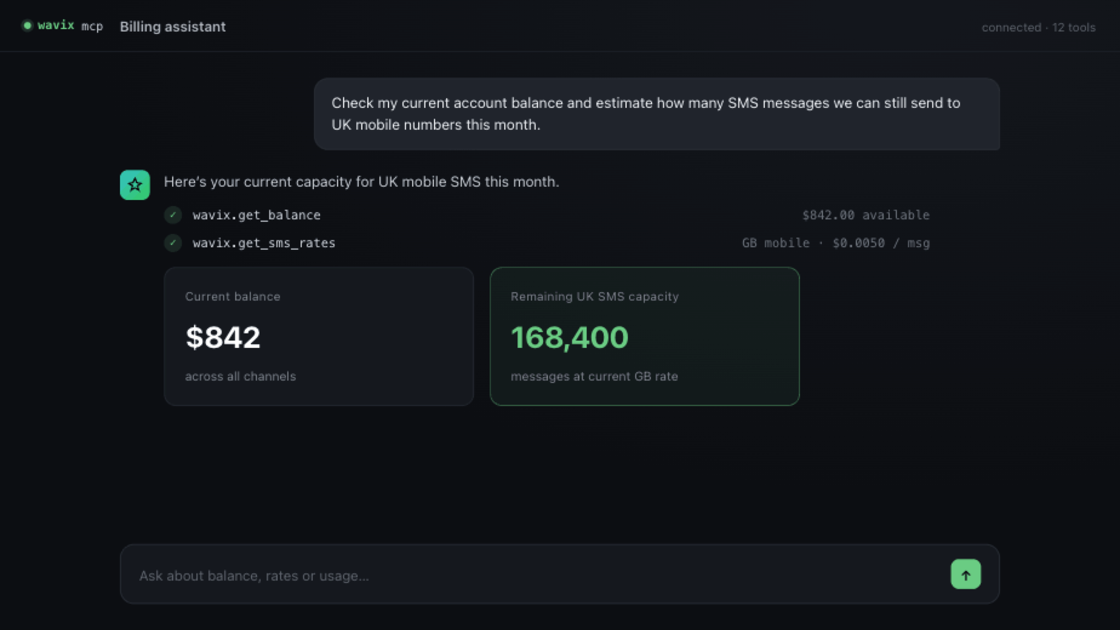
Normally this means opening the billing dashboard, looking up destination rates, and doing the maths manually. With the Wavix MCP Server, the agent retrieves the account balance, checks current UK SMS rates, and returns a projected send capacity immediately.
“Current balance: $842. Estimated remaining UK SMS capacity: 168,400 messages.”
For teams running high-volume messaging, Voice AI notifications, or authentication workflows, that’s operational visibility without the manual calculation.
How This Changes the Way Teams Work
MCP doesn’t replace the Wavix API. It removes the ten manual steps between “I have a question about my infrastructure” and “I have an answer.”
Developers already use AI coding assistants to write code, debug applications, and automate repetitive tasks. The Wavix MCP Server extends that directly into communications infrastructure, so querying live account data, searching transcript indexes, provisioning numbers, and checking billing capacity all happen inside the same environment where the code gets written.
Operational tasks that used to require dashboards, exports, and SQL queries now take a prompt.
Start Using the Wavix MCP Server
Getting started takes minutes. Full documentation and example prompts: docs.wavix.com/mcp/overview